
CoTreat Chairside is designed to sit quietly inside your consult workflow - handling the documentation, review, and patient communication that builds up around a clinical day, so you can stay focused on the patient in front of you.
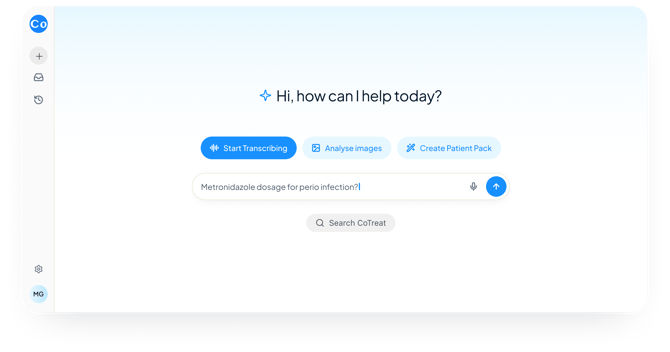
This article covers what Chairside does, how clinicians are using it in real workflows, and the best place to start.
Start here
The fastest way to find out if Chairside fits your day is to use it once in a real consult. Pick one of the following and try it today.
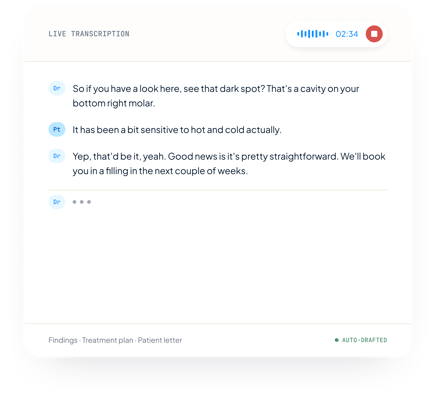
Transcribe a consult
Open Chairside, start a new consult, and hit record before the patient sits down. Talk naturally. Chairside captures the conversation and structures the key clinical points into a summary when you're done.
💬 Try this prompt: "Summarise this consult as a clinical note. Include chief complaint, examination findings, diagnosis and recommended treatment."
Upload an image and ask a question
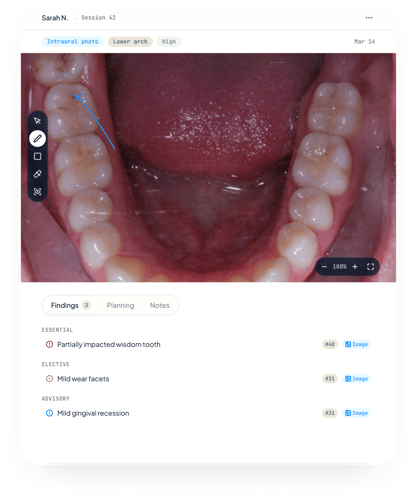
Upload an OPG, bitewing, periapical, clinical photo or intraoral scan. Ask Chairside to review findings, flag priorities, or suggest planning notes.
💬 Try this prompt: "Review this OPG. List all findings by tooth number, categorised as essential, elective or advisory, with suggested ADA item codes."
Generate a patient pack
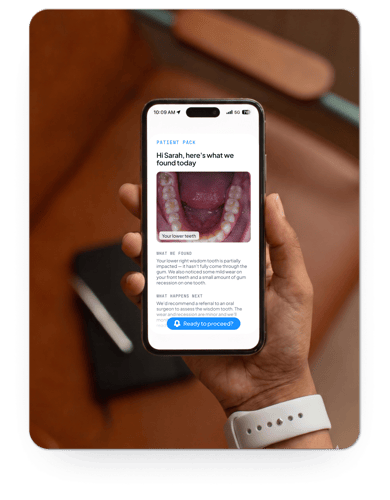
After a consult, ask Chairside to generate a plain-language summary the patient can read and revisit at home. Send it by SMS or email directly from Chairside.
💬 Try this prompt: "Create a patient pack from this consult. Include what was found, what treatment is recommended and why, and what the patient should do next. Write it for someone with no dental background."
The goal isn't to use every feature immediately. It's to find the one moment where Chairside makes your clinical day a little easier - and build from there.
What Chairside does
Record and transcribe consults
Record a consult and Chairside transcribes it in the background. When you're done, review the structured summary - or use it as the starting point for notes, treatment plans, or patient communication. No rewriting from scratch.
Review patient images and findings
Upload radiographs, clinical photos, or intraoral scans and ask Chairside questions about what it sees. Findings are returned structured by tooth number, categorised as essential, elective or advisory - alongside your own review, not replacing it.
Supported image types: OPG, bitewing, periapical, clinical photo, intraoral scan.
Generate treatment plans with item codes
From a consult transcript or uploaded findings, Chairside can populate a treatment plan with ADA item codes and tooth numbers - categorised by priority. The plan is ready to review and adjust before it goes anywhere.
Get feedback on your consult
After a consult, ask Chairside to review how the clinical information was communicated and where patient understanding could be improved. Useful after a complex or difficult consult - or whenever you want a second perspective on how something landed.
💬 Try this prompt: "Review this consult and give me feedback on how clearly treatment was explained. What could have been communicated better for this patient?"
Send personalised patient packs
Generate a patient-friendly summary from the consult and send it by SMS or email in one step - before the patient has forgotten half the conversation. Findings, recommended treatment, next steps, all written in plain language.
Ask clinical questions in context
Ask Chairside clinical or medical questions in the context of a specific patient case - drug interactions, contraindications, clinical protocols - without leaving the workflow.
💬 Try this prompt: "This patient is on warfarin and needs an extraction. What should I consider for haemostasis and post-op care?"
How clinicians are using it
Productivity-focused clinicians tend to start with transcription - using it to skip the post-consult note rewrite, then extending into treatment plan generation as the habit builds.
Clinicians focused on clinical review tend to start with image upload - using Chairside as a second perspective on complex cases, then extending into patient-facing explanations of the same findings.
Clinicians focused on patient communication tend to start with patient packs - generating and sending a follow-up after every consult, then extending into consult feedback to improve how findings are explained in the chair.
There's no wrong starting point. The clinicians getting the most value from Chairside started with one friction point in their day and built from there.
How Chairside sits alongside your existing CoTreat platform
Chairside and your existing CoTreat platform are two separate products. They do not currently connect to each other.
Your existing CoTreat account, patient records, treatment plans, PMS integrations, and workflows are completely unaffected by Chairside. Nothing changes on that side.
Chairside is accessed separately at dental.cotreat.ai and requires its own activation. It is designed for use by clinicians during and after consults - it is not a replacement for your existing CoTreat workflows.
Think of them as complementary for now - your existing CoTreat platform handles practice-side workflows, while Chairside supports the clinician during the clinical day.
What's available now and what's coming
Available now in Chairside
- Consult transcription and structured clinical summaries
- Treatment plan generation with ADA item codes and tooth numbers
- Radiograph and clinical image review (OPG, bitewing, periapical, clinical photo, intraoral scan)
- Consult feedback and communication review
- Patient pack generation
- Patient pack delivery via SMS and email
- Clinical and medical questions in the context of a patient case
Not yet available in Chairside
The following are not currently available in Chairside and are still in development or planned for a future release:
- PMS integration (Dental4Windows, Exact, Core Practice, Dentally, and others) - planned
- Imaging software integration (ImageViewer and others) - planned
- Calendar and appointment-based workflows - planned
- Two-way SMS conversation workflows from Chairside
- Automatic syncing of patient records between Chairside and the existing CoTreat platform
- Chairside data visible within the existing CoTreat platform
If a workflow you rely on is not yet available, the existing CoTreat platform continues to support it unchanged.
Commonly asked questions
Does Chairside connect to my PMS? Not yet. PMS integration is planned. At this stage, Chairside operates as a standalone workflow tool - you enter or upload patient information directly within the session.
Can I see my existing CoTreat patients and treatment plans in Chairside? Not at this stage. Chairside and the existing CoTreat platform currently operate independently. Your existing patient records, treatment plans, and workflows in CoTreat are unaffected.
Does Chairside integrate with my imaging software? Not yet. You can upload images directly into Chairside from your device, but live integration with imaging software is planned for a future release.
Can I send SMS to patients from Chairside? Patient packs can be sent by SMS or email directly from Chairside. Full two-way SMS conversation workflows are not yet available in Chairside - these remain available in the existing CoTreat platform.
Is my data secure? Yes. Chairside follows the same data security and privacy standards as the existing CoTreat platform. Patient information entered into a Chairside session is handled in accordance with CoTreat's privacy policy.
Will Chairside replace CoTreat? No. Chairside is a new product focused on clinician-side consult workflows. The existing CoTreat platform continues to operate and will not be replaced by Chairside.
A few things worth knowing
Chairside supports your clinical judgement - it doesn't replace it. Everything it generates is for your review. Treat its findings and summaries as a starting point, not a final answer.
You don't need to learn every feature. The best way to learn Chairside is through real workflow usage - one consult at a time.
Chairside is an early access product. Workflows and capabilities are evolving quickly based on how clinicians are using it in practice. If something isn't working as expected, reply to any of our emails or submit a support request - we read every one.
Activate your access
If you haven't completed the activation form yet, you can do so here:
Access is sent automatically once the form is submitted. The form takes about a minute to complete.
If you'd like a walkthrough first, book a quick session here.