
What's actually happening:
Modern phones (Android especially) show a caution whenever a link arrives from a mobile number the phone doesn't recognise as a saved contact. It's a generic phone-level warning about unknown senders, not about your practice or the pack itself. Tapping Continue opens the pack normally, and the pack stays protected by the patient's date of birth regardless.
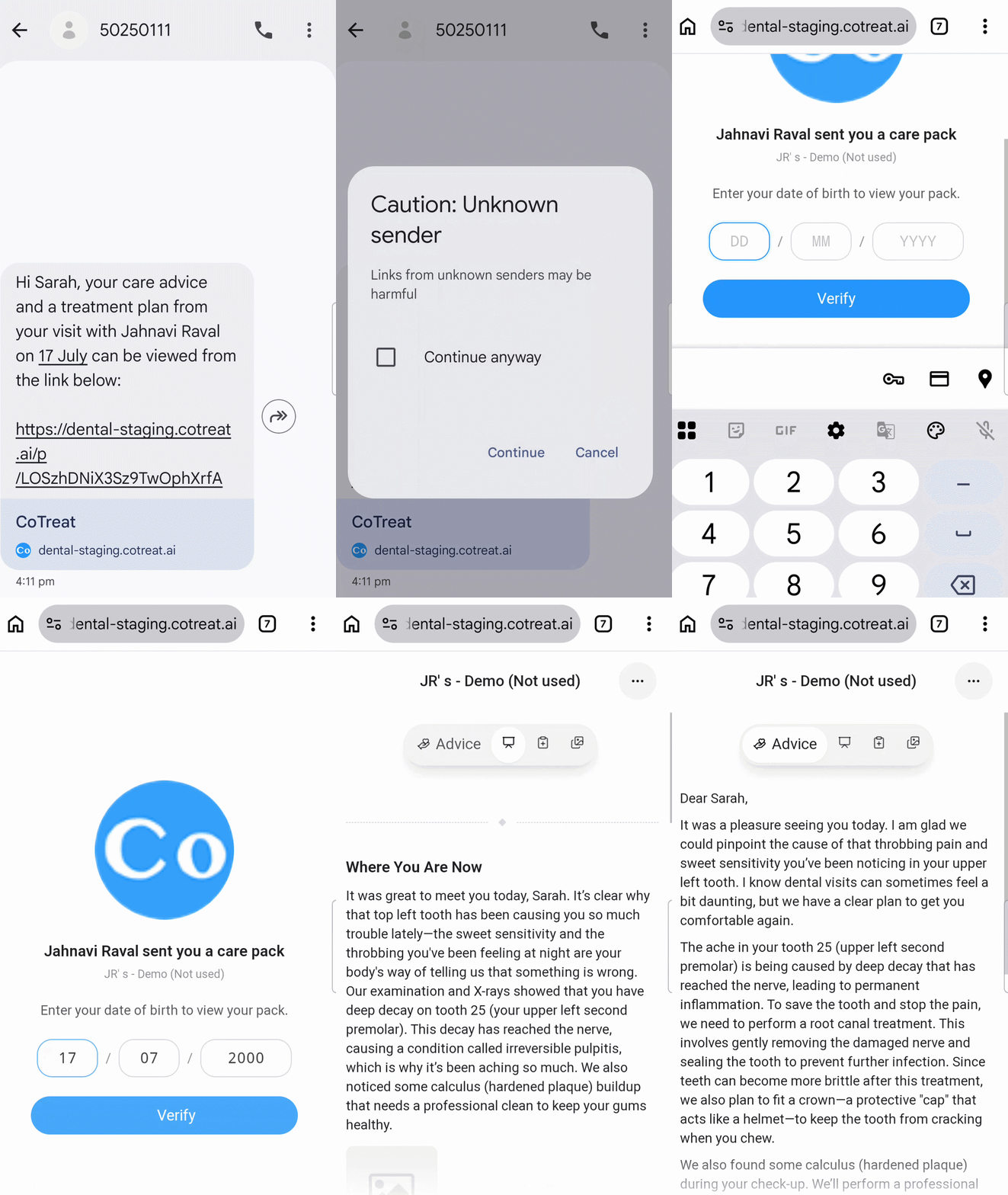
What should you say to your patient if they reach out to you?
"You are right to be cautious - that warning shows up whenever your phone gets a link from a number not saved in your contacts. It's your phone being safe by default, not a problem with the message. The link is genuine and secure - it opens your care pack, which is protected by your date of birth so only you can view it. Please tap Continue, and if you'd like, save our practice number to your contacts so the warning doesn't appear next time."
Why the pack is still safe even past the warning:
- The pack itself is behind a date-of-birth verification - nobody but the patient can open it, even if the link is forwarded
- Every access attempt (including failed date-of-birth entries) is logged in the pack's activity feed
- The link is a one-time secure link to your patient's specific pack; it doesn't lead anywhere else
How to check if the patient did get in:
Open the session → click the status pill on the pack → look at the Activity feed:
- "Share link visited" entry appears → the patient got past the warning
- "Verification attempt failed" appears → they got past the warning but entered the wrong date of birth
- No entries → they haven't tapped the link yet; they may still be worried, or the SMS may not have delivered
If the patient still won't open the link:
- Offer to re-send by email from the Share panel - most email clients don't show the same warning
- Ask them to save the practice number to their contacts first, then tap the link - the warning usually disappears on the second try
- Reassure them that no personal details are shown until they type their date of birth - so opening the link commits them to nothing
Good to know:
- The warning is coming from the patient's phone, not from CoTreat or your practice. There is nothing to fix on the CoTreat side.
- iPhones and Androids handle unknown senders differently - the exact wording varies. iPhones tend to just filter to "Unknown Senders"; Android often shows a "may be harmful" banner.
- Saving your practice number to Contacts is a permanent fix for that patient. Front desk can suggest this proactively when confirming appointments.
Tip: if a lot of patients ask about this, consider including a one-line reassurance in your appointment-confirmation email or the SMS itself - for example: "You'll receive your care pack from [practice mobile number]. Your phone may show a caution because it's from a new number - this is normal, please tap Continue to open."