
Setting up your CoTreat account is quick and straightforward, easily personalise your profile, notifications and audio settings.
Table of contents
Your account settings
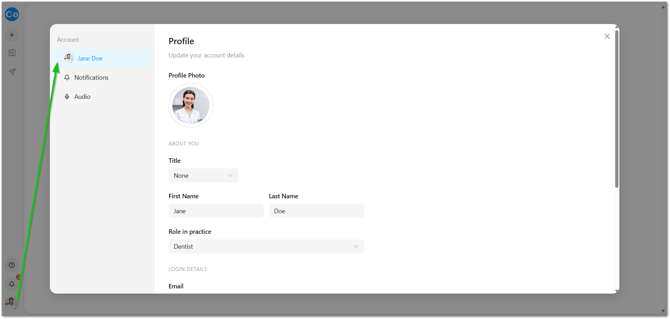
These settings are available to everyone, no matter your role in the practice. You'll find them under Account in the left-hand menu.
Your profile
Update your profile photo, title, first and last name, and your role in the practice. This is also where you can review your login email.
Notifications
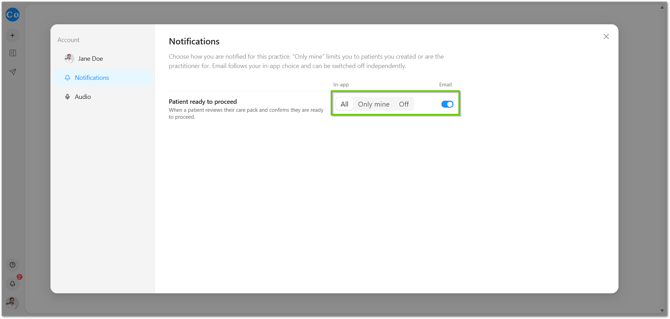
This is where you control when you hear about a patient who's ready to proceed - useful to get right if you're the one following up.
- Choose whether to be notified for all sessions, only my sessions, or turn proceed notifications off entirely.
- Turn email notifications on or off separately.
💡 Tip: If you're the one calling patients back after they tap "I'd like to proceed" on a Care Pack, keep this switched on - it's how you know to follow up while they're still warm.
Audio
These settings adjust how CoTreat's recorder handles background noise, so your transcription stays accurate.
- Music filtering - if you often have a TV or radio playing in the background, turn this up (to Strong, for example) to more aggressively filter it out.
- Silence sensitivity - adjusts how quickly CoTreat treats a pause as the end of speech.
📝 Note: There are a few more technical audio settings on this page as well - you shouldn't need to touch these day to day, so it's fine to leave them at their defaults.