
CoTreat connects to your practice management system (PMS) so patient details, images, and treatment plans flow straight into CoTreat without double handling. This article walks through exactly what syncs, what doesn't, and how image syncing works depending on your setup.
PMS and imaging integrations are only available on a Practice account. See Connecting Your Practice Management System or Imaging Software for how to check support and request a connection.
Table of contents
- Understanding One-Way Sync
- What Data Syncs From Your PMS
- Editing a Patient's Record in CoTreat
- Connecting Your Image Viewer
- Syncing Images via Google Drive or OneDrive
- Supported Practice Management Systems & Image Viewers
- Common Questions
Understanding One-Way Sync
CoTreat's connection to your practice management system is one-way only. Information flows from your PMS into CoTreat — CoTreat doesn't send anything back the other way.
CoTreat doesn't write information back into your practice system. This isn't currently supported by the practice management systems CoTreat integrates with.
What Data Syncs From Your PMS
Once your PMS is connected, CoTreat syncs across:
- Patient details — name, date of birth, mobile number, and email address. This is what lets a Care Pack be sent directly from your synced patient data, rather than needing to be entered again.
- Patient images already stored in your practice system.
- Treatment plans that have already been created in your practice system.
Editing a Patient's Record in CoTreat
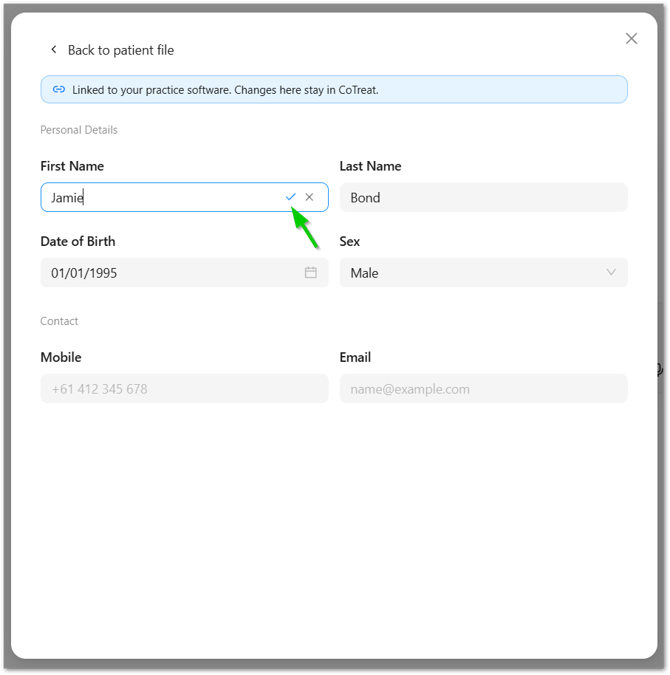
You can update a patient's details directly within CoTreat - for example, to fix a typo or add a mobile number that's missing.
Edits you make to a patient's record in CoTreat don't sync back to your practice management system. If the same detail also needs to be correct in your PMS, update it there separately.
To edit a patient's record:
- Search for the patient.
- Select the patient from the search results.
- Click the patient's name to open their patient file.
- Click Edit.
- Enter your changes.
- Click the tick icon to save your changes.
Connecting Your Image Viewer
Where your practice uses a separate image viewer, CoTreat connects to it directly and pulls images across, matching each patient by name and date of birth exactly as they're stored in that viewer.
Because matching relies on the patient's name and date of birth as they appear in your image viewer, it's worth checking those details line up with your PMS records before connecting, mismatched spelling or details can stop images from syncing to the right patient.
Syncing Images via Google Drive or OneDrive
Some practices use Google Drive or OneDrive to store patient images rather than (or alongside) a dedicated image viewer. CoTreat can sync from these too, but it depends on how your folders are already structured and named.
Ideally, each patient's folder should be named with their last name and first name (or first name and last name) plus their date of birth, so CoTreat can identify the right patient. This folder structure should already be in place in your Google Drive or OneDrive before connecting it to CoTreat.
If your patient folders aren't already named this way, CoTreat won't be able to reliably match images to the right patient. It's worth checking, and tidying up, if needed, your folder naming before connecting a cloud drive.
Supported Practice Management Systems & Image Viewers
CoTreat currently supports the following practice management systems, each with its own supported image viewer integration(s):
|
Practice Management System |
Supported Image Viewer(s) |
|---|---|
|
Dental4Windows |
Centaur Media Suite |
|
Core Practice |
Core Practice Image Module |
|
Dental4Web |
MediaWebPACS |
|
CareStack |
AEKA |
|
Dentally |
Dentally Vision |
|
Principle |
Principle Imaging |
|
Zavy360 |
Zavy Imaging |
|
Sidexis, Romexis |
|
|
Examine Pro |
|
| Google Drive, OneDrive |
Common Questions
Can CoTreat write information back into my practice system?
No. Write-back to your practice management system isn't currently supported, the connection between CoTreat and your PMS runs one way only, from your PMS into CoTreat.
If I edit a patient's details in CoTreat, will it update in my PMS?
No. Edits made in CoTreat stay in CoTreat only. If the same detail needs to be correct in your PMS as well, update it there separately.