
When a patient taps "I'd like to proceed" on their Care Pack, acting quickly matters - especially for an incomplete treatment plan, or a patient who seemed on the fence. Here's how to catch it, review where every patient stands, and follow up.
In this article:
- Getting the Notification
- Reviewing Packs by Status
- Updating a Pack's Status
- Encouraging Patients to Open Their Care Pack
- Following Up With a Patient
Getting the Notification
When a patient taps "I'd like to proceed," you'll be notified straight away - so you can follow up while it's still front of mind, rather than days later.
- A notification appears in the bottom-left of your browser.
- If email notifications are enabled, you'll also get an email.
Notification preferences - including whether you're notified for all sessions or just your own, and whether email notifications are on - are set under Account > Notifications. See "Setting Up Your Account" for details.
Reviewing Packs by Status
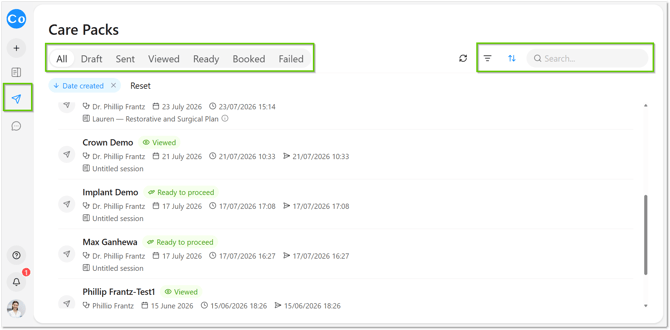
Go to Packs in the left-hand menu. From here, you can sort or filter packs to see where each patient stands:
- Sent - the Care Pack has been sent, but the patient hasn't opened it yet.
- Viewed - the patient has opened their Care Pack.
- Ready - the patient has tapped "I'd like to proceed" to say they want to go ahead.
Tip: Use the Viewed status to prioritise patients who've shown interest by opening their pack, even before they've tapped "I'd like to proceed."
If you notice a lot of packs sitting in Sent but not yet Viewed, it may mean those patients aren't aware a pack has been sent to them, or are hesitant to open it - see Encouraging Patients to Open Their Care Pack below.
[
Updating a Pack's Status
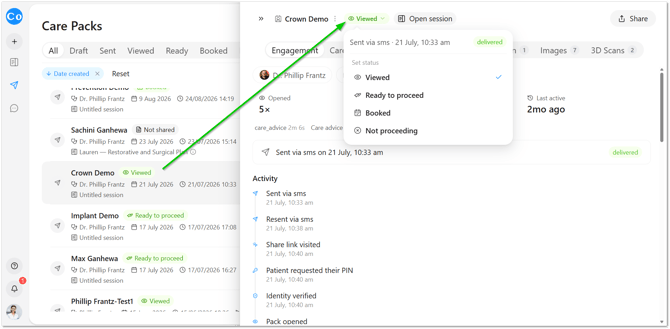
Once you've followed up with a patient - for example, after calling them back - update the pack so the rest of the team can see the outcome:
- Open the pack.
- In the top right, click the current status.
- Select Booked or Not Proceeding, depending on the outcome.
Encouraging Patients to Open Their Care Pack
Before a patient leaves the room or the practice, mention that they'll receive an SMS with a link to what was discussed today, so they know to expect it. A patient who wasn't told anything is coming is far more likely to mistake it for spam and never open it - this one line makes a real difference to how many packs get seen.
"Just so you know what to expect - you'll get a text from us shortly with today's summary and your treatment plan. It's easy, just a link, nothing to download or log into."
Following Up With a Patient
When you're calling a patient back - whether they've tapped "I'd like to proceed" or you're checking in on a treatment plan they haven't yet decided on - a short, warm check-in works best:
"Hi [name], it's [your name] from [practice] - I saw you had a look at the treatment plan we sent through and wanted to check in. Did you have any questions, or would you like to get something booked in?"
If they're ready to proceed, move straight into booking. If they're still deciding:
"No problem at all - is there anything specific you're still weighing up? Happy to answer anything, or send through a bit more information if that would help."
Once you've spoken with them, update the pack's status above so it's reflected for the rest of the team.