
At a glance
- Why Care Packs Matter
- Recording Your Appointment
- Reviewing the Care Pack Sections
- Refining a Care Pack Further
- Changing the Practitioner on a Care Pack
- Sending the Care Pack
- Answering Common Questions
- The Long-Term Impact
- Best Practice
Why Care Packs Matter
A great consultation doesn't end when the patient leaves. Patients forget much of what they hear - questions come up later, instructions blur, and small recommendations get lost.
A Care Pack closes that gap: reinforcing your advice, giving patients something to refer back to, and extending the value of your consultation. The most effective practices don't save Care Packs for major cases - they send one after every visit.
The easiest way to make Care Packs a habit is to treat them as the final step of every consultation.
Think of it as continuing the consultation after the patient has walked out the door.
Recording Your Appointment
Begin with recording your consultation as you normally would - see Capturing a Consult with Transcribe for the full walkthrough.
Reviewing the Care Pack Sections
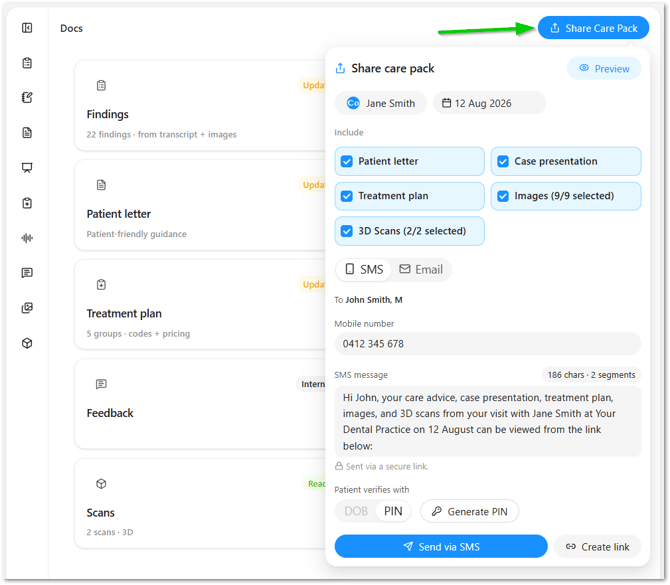
Care Pack has five sections:
| Section | What it contains |
|---|---|
| Patient Letter | Plain-language explanation of findings and recommendations |
| Treatment Plan | Clinical items and next steps |
| Case Presentation | A priced, patient-facing proposal built from the session |
| Images | Radiographs and photos from the session |
| 3D Scans | Any uploaded scan files |
All sections are optional, though at least a patient letter or case presentation should be generated before you can send out a Care Pack.
Refining a Care Pack Further
Refining always applies to one specific tool - either the Patient Letter or the Case Presentation - so tag the right one before you prompt:
- Go to the chat bar and click Create.
- Select Patient Letter or Case Presentation from the dropdown.
- Type your refinement.
Some examples:
- "Summarize the treatment plan into three clear next steps."
- "Explain why this cracked tooth may eventually split."
- "Explain periodontal disease in simple patient-friendly language."
- "Translate extraction aftercare instructions into Mandarin."
- "Translate implant post-op instructions into Vietnamese."
- "Simplify these instructions to an 8th-grade reading level."
Changing the Practitioner on a Care Pack
Before a practitioner can be selected, they need to be added under Account Settings > Practitioners > Add Practitioner.
To link a practitioner to their user account, they need to have already accepted their user invite to the platform. See here for more details: Invite your team
Once they're added, you can choose which practitioner a Care Pack is sent under. In the Share Care Pack window, click the practitioner's name at the top, then search for or select the right one from the list - or add a new practitioner directly from there.
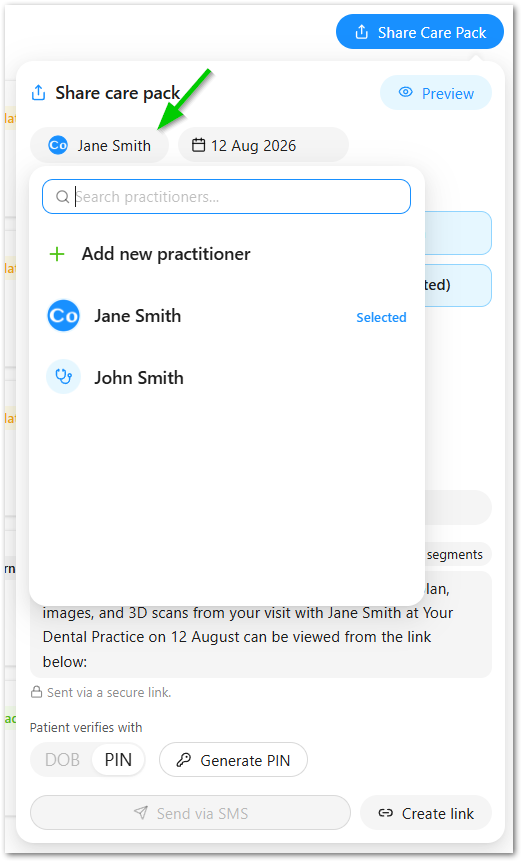
Useful for practices with more than one practitioner on the account, or when a Care Pack needs to go out under a different name than whoever ran the session.
Sending the Care Pack
You can't send a Care Pack until the patient has been linked to the consultation.
If you make changes to any section, Chairside will ask you to regenerate the Care Pack before it can be sent, so the patient always receives the latest version.
Click Preview to view the pack as the patient would.
Editing the SMS or Email Wording
Before a Care Pack goes out, you can edit the wording of the SMS or email message the patient receives alongside it - so the message can be tailored to the patient or the situation rather than always reading the same way.
Message templates aren't available yet, so this wording is a manual edit, rather than saved as a default.
Once you're happy with the content, click Send to share it with your patient via email, SMS, or a secure link.
Answering Common Questions
Does Chairside automatically resend reminders or follow-ups? No, that's not currently sent automatically.
The Long-Term Impact
One Care Pack won't transform your patient experience - sending one after every visit will.
Over time, patients begin to associate your practice with clear communication, transparency, and follow-through. They feel informed, supported, and confident about their care, not just during the appointment but afterwards too.
Those moments build trust, strengthen relationships, and reinforce the value of every consultation.
Best Practice
Aim to send a Care Pack after every consultation, even the shortest and most straightforward ones.
Consistency creates better patient experiences and makes Chairside part of your everyday clinical workflow.